Telegram bot development
Bots for notifications, enquiries, bookings and reports — with an admin panel, a link to your site or CRM and support after launch.

A Telegram bot is the shortest path from an event to a person: a new order, an enquiry from the site, a payment or a status change reaches the phone in a second, and the reply or a button press happens right in the chat. RandomStar’s bots run every day in its own services — so your task gets proven solutions, not experiments.
What a bot can do
- Notifications. New orders and enquiries, payments, stock levels, repair or delivery status — to customers or your team, instead of paid SMS.
- Enquiries and bookings. The bot takes requests, books a service, asks follow-up questions and passes everything to the admin panel. A reply from the admin panel reaches the person in the same chat.
- Channel and mailings. Scheduled automatic posts: product selections, news, new items from your database.
- Reports. A daily summary of sales, leads or errors — without logging in to the admin panel.
- Link to your site and CRM. A person links their site account to Telegram, and the bot shows their data and performs actions with buttons: “Confirm”, “Cancel”, “Watch”.
- Payments. The bot sends an invoice with a card payment link via WayForPay and reports when the money arrives.
Bots already in production
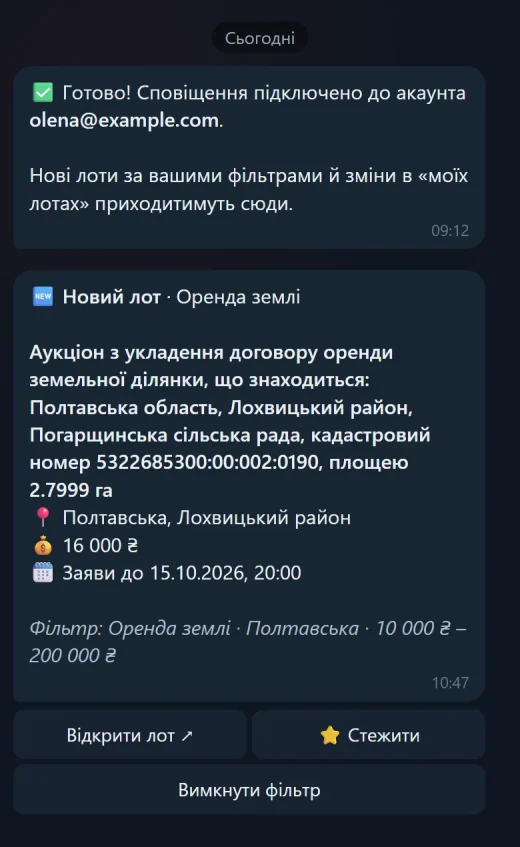
- LotRadar. The bot of the Prozorro.Sale auction service sends new lots matching a user’s filter as soon as they appear. Each message has “Open lot” and “Watch” buttons; for watched lots the bot reports price and date changes and auction results. A plain message to the bot becomes an enquiry in the admin panel, and the reply from there comes back to the chat.
- The @prozorro_radar channel. The same bot posts a selection of fresh lots there every day on its own.
- ServiceCenterSoft. In the repair tracking software, a workshop’s customers get repair status updates in Telegram — instead of SMS.
How it works
- A webhook, not polling. Telegram pushes every message to a protected address with a secret key — replies are instant and the server is spared needless requests.
- Account linking without passwords. A “Connect Telegram” button in the customer area opens the bot with a one-time link; the person taps “Start” and the chat is linked.
- Telegram limits are handled. Messages go through a queue: if Telegram asks to wait, the rest is sent on the next run; if a person blocks the bot, messages to them stop.
- Managed from the admin panel. The bot token, the channel, who has connected and how many messages went out today — all visible and adjustable in the admin panel.
- Safe checks. Bot scenarios are run by automated tests without the real network — a new change will not break what already works.
How the work goes
- Scenario. What the bot says, its commands and buttons, where it takes data from and where it sends it — on one page.
- Estimate. Stages with the cost and timing of each; you pay for an accepted result.
- Test bot. You try the scenario in your own Telegram before launch.
- Launch. The bot runs on your account and server; the code and access are handed over to you.
- Support. New commands, text changes, server updates — whenever needed.
How much it costs
The price depends on the scenario: how many commands and buttons, whether it needs a link to your site, CRM or payments, whether there is an admin panel. That is why there is no “from $25” price list — after a request and a short call you get an estimate for your task.
Frequently asked questions
Who owns the bot?
You do. The bot is registered with @BotFather on your Telegram account, and after full payment the code and access pass to you.
Where does the bot run?
On a server or hosting with HTTPS — yours or a new one, with help choosing and setting it up.
Can the bot be connected to a site, CRM or 1C?
Yes: the bot takes data from your database or via an API and can write enquiries, orders and statuses back.
How long does development take?
It depends on the scenario: a simple notification bot is a single task, while a bot with a customer area, payments and a channel takes several stages. The timing of each stage is in the estimate.
Got a task? Let’s talk
Send a request — the reply comes within a business day with a suggestion on how to do it.